Home
Blog
Find 500 B2B Contacts for Free Every Month with Built-In Outreach.
Home
Blog
Sagar Sharma
Published December 1, 2025
10 min

Try Oppora AI
Create Self-Running Agentic Sales Workflows like N8N just by chatting with AI
Get Started for FREE
Most people spend too much time trying to find company email addresses. They jump between tools, guess email formats, or scrape LinkedIn manually.
These methods work sometimes, but they are slow and inconsistent.
This guide shows a faster way.
If you’ve ever wondered how to find company email addresses without wasting hours, Oppora gives you a simple and automated path.
It finds real leads, verifies data, and builds clean lists, so you never have to hunt for some other manual process.
Let’s jump into the process.
Oppora gives you multiple ways to discover accurate contacts. You can add companies manually, upload them in bulk, or let the AI find companies for you.
Every method works with email extraction, verification, and automated workflows, making it one of the best ways to find company email addresses quickly.
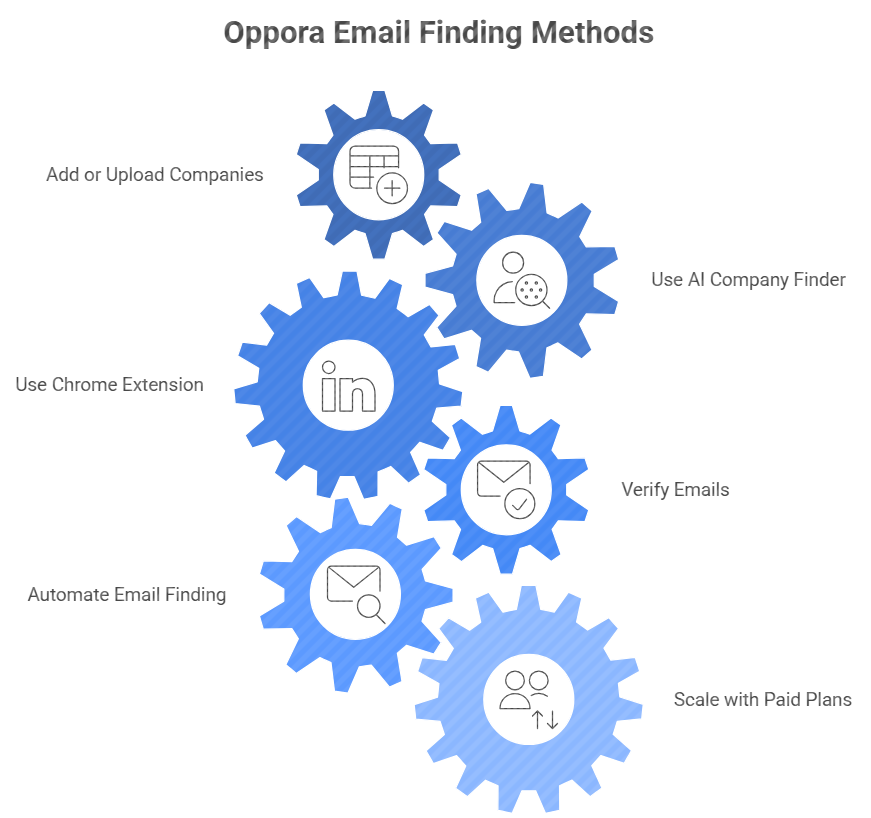
You can start by adding one company or an entire list. Oppora then finds emails based on job role, department, seniority, location, or company size.
This works well if you already know the organizations you want to target and only need the right people inside them.
It’s a clean and structured way to find email addresses by company or find email address by company name while avoiding manual research. Below are the different ways you can do this.
If you only need contacts from a specific company, you can add it manually. Enter details like company name, industry, employee size, domain, LinkedIn URL, or website. Even if some fields are missing, Oppora enriches the profile automatically.
For example, if you add “Acme Logistics” with only a website link, Oppora can identify the industry and team size on its own. Once the company is saved, you can instantly pull contacts like Operations Managers, HR Heads, or Marketing Leads.
This is a simple way to find an email address without checking multiple sites.
If you work with many accounts at once, uploading a CSV saves a lot of time. Add a list of company names or domains—Oppora handles everything else. It enriches the companies, identifies missing details, and prepares each one for bulk extraction.
This method is perfect for agencies or teams sourcing hundreds of accounts weekly. Instead of researching manually, Oppora finds verified contacts for every company in the sheet.
It becomes easy to find company email addresses free at scale and access a large number of companies and people in minutes.
Once your companies are ready, you can refine exactly what types of contacts you want. Choose departments like HR, Finance, Sales, or Engineering. Pick seniority levels like Manager, Head, VP, or C-Level. You can even specify how many contacts you want per department.
For example, you can request 5 Heads of HR and 3 Finance Managers from each company. Oppora then finds only those contacts—nothing extra.
This helps you stay focused and gives you a clean prospect list.
Sometimes you don’t have a target list yet. You only know the type of companies you want. Oppora’s AI Company Finder solves this.
Type a simple instruction, get a list of matching companies, select the ones you want, and Oppora pulls the right contacts. It’s an easy way to find company email addresses online without manual search.
You can describe the kind of companies you’re looking for in plain language. For example: “Find fintech startups in London with 50–200 employees,” or “Find US-based logistics companies hiring for sales roles.” Oppora filters companies by industry, size, location, and even growth signals.
This saves hours you would otherwise spend researching. Once the list appears, you can review each company profile. It becomes simple to find email address from company name or pull a large set of email addresses of companies and people that match your exact criteria.
After Oppora shows the list, you can pick the companies that fit your campaign. Select one, ten, or a hundred at once. Then choose the roles or departments you want—like Sales Managers, HR Leads, or Finance Heads.
Oppora gathers all relevant contacts and extracts emails in one go. This lets you instantly find company email address details from many organizations and find company email addresses online without switching tools or doing manual work.
If you already spend time on LinkedIn, the Chrome extension keeps things simple. Open a company page, visit an employee list, or check a single profile. Oppora reads the page and finds the matching emails instantly.
You can select multiple profiles and extract them in bulk. This is useful for teams who need to find company employee email addresses while browsing LinkedIn.
Finding emails is one step. Making sure they don’t bounce is another. Oppora includes verification with every plan. It checks emails using standard validation and deeper SMTP-level verification.
This reduces bounce rates and protects your sending domain. With 50 free verifications each month, you can clean your list without extra tools. It’s one of the best ways to find email addresses that are ready for outreach.
Most people repeat the same steps every day—open a tool, set filters, search for new companies, find contacts, verify emails, export the list, and do it all again tomorrow. It’s slow, boring, and easy to forget. Oppora removes that repetition completely.
You can connect multiple AI agents into one automated chain. Use agents like Company Crawl, AI Enrich, Company Filter, Find Leads, AI Recommendation, Search Contact, Verify Contact, and Generate Campaign. Each one handles a different part of the workflow. Together, they run the entire process without you touching anything.
Think of a flow like this: Oppora crawls new companies, enriches them, filters by industry or size, finds the exact roles you want, verifies those emails, and prepares everything for outreach. All on its own. Once saved, you don’t need to log in daily or rebuild filters. You can also duplicate workflows to speed up new campaigns.
It’s the easiest way to keep fresh leads flowing. And it works perfectly for anyone who wants to find company email or needs a simple, reliable system without doing the same tasks again and again.
When your outreach grows, you may need hundreds or thousands of verified emails each month. Oppora’s paid plans support that with bulk extraction, automated workflows, and multi-inbox management. Agencies and outbound teams use this setup to run high-volume lead generation without friction.
But if your usage is low, you don’t need to upgrade. You can stick to the free plan and get 50 verified company emails every month, which is enough for smaller campaigns or occasional prospecting.
Not every method needs a tool. You can still find company emails with simple manual steps.
But manual methods can take time. You jump between websites, social profiles, search engines, and spreadsheets. There’s a lot of guessing, checking, and hoping the email doesn’t bounce.
But for any reason if you don’t want to use a tool or you’re working within limits like small lists, budget restrictions, missing data, or one-off lookups—there are still some ways to find company emails on your own. Below are the most practical manual methods.
Many companies share email details across different sections of their website. Check their About page, Contact page, and Team page. Look at the Press or Media kit section. Some companies also list authors on their blog, and those authors often have publicly visible emails.
If the website has a chatbot, ask it for the correct contact email. Many chatbots are connected to internal support systems and will share addresses for sales, HR, or partnerships. These small areas can help you find company email addresses without advanced tools.
Most companies follow predictable email formats. Patterns like [email protected], [email protected], or [email protected] are very common. If you know someone’s name and the domain, you can try these variations manually.
Once you have a few guesses, check which one is valid using any free email checker. This works best when you already know who you want to reach, and you only need the correct version of their address. It’s a simple way to find a company email address without searching through multiple platforms.
LinkedIn doesn’t show email addresses by default, but it shows roles, departments, and names very clearly. If you’re trying to reach a Head of HR or a Sales Manager, start by identifying them here. Once you know their name, you can combine it with the company domain and guess the email pattern.
You can also check their LinkedIn “Contact Info” section. Some people include their business email there. This is a helpful way to find company employee email addresses when other sources don’t give enough information.
Tech companies often leave traces of their emails across engineering platforms. Developers sometimes include personal or workplace emails inside GitHub repositories, README files, or issue threads. Internal documentation or API docs might list “support@” or “engineering@” addresses.
Slack communities are another hidden source. Many companies share invite links or contact emails for joining private groups. These areas make it possible to find email address by company name without depending on sales tools.
Google is powerful when you know how to search. Try queries like:
PDFs, press kits, investor documents, or public decks often contain real emails. You can also filter results by date to find the most recent contacts. It’s one of the fastest free ways to find company email addresses online using only search operators.
Many teams share business emails across their social profiles. TikTok Business Pages, Instagram Professional Accounts, and Facebook Pages often include a visible “Email” button or list addresses inside the About section.
Sometimes, important details hide in highlights, pinned posts, or story archives—especially for small or local businesses. It’s an easy way to find email addresses with no extra tools.
Email permutator tools generate every possible version of a person’s email based on their name. You enter the first name, last name, and company domain. The tool creates dozens of combinations instantly.
This works when you know exactly who you want to reach but don’t know their email. Still, these tools have limits: low accuracy, no verification, and little context. Use them when you want to try everything and narrow down the correct address manually.
Platforms like Crunchbase, Apollo Free, or ZoomInfo Free give limited access to company-level contacts. You can often see key decision-makers, basic job titles, and company domains. These databases help when you need starting points rather than full email lists.
But be careful. Many users try to scrape these platforms, which can violate terms of service. Some data might also be outdated or partially masked. These sources are helpful for direction, not for complete lists.
AI chatbots can guess likely email formats for specific domains. For example, you can ask: “What is the standard email format for acmecorp.com?” The AI will analyze common structures and share possible patterns.
This works when you know the person’s name but lack the exact email address. But it has limits. AI won’t reveal private data, and answers depend on publicly available patterns. Use it as a helper, not a primary source, when trying to find email address by company name.
Once you have a list, treat it carefully. Follow simple habits that keep your outreach accurate, compliant, and respectful. This helps you protect deliverability and build trust while you find company email addresses or reach out to new contacts.
A clean list matters more than a long list. Always verify emails before sending your first message. Verified emails reduce bounce rates, protect your domain, and keep you out of spam folders. This also ensures you don’t waste time on dead addresses.
People respond to messages that feel human. Keep your emails short. Mention something specific about their company or role. Explain why you’re reaching out in one sentence.
Avoid long intros, heavy pitch lines, or bulky templates. A simple message with a clear reason for contacting them gets more replies. Personal relevance always beats volume.
Every outreach campaign needs to follow the rules. This includes GDPR for EU contacts, CAN-SPAM in the US, and opt-out requirements everywhere. Add an unsubscribe link or a clear removal option in each email.
Never hide the purpose of your message. And don’t store or share data without permission. Clean compliance keeps your domain safe and improves trust.
Even the best email addresses won’t help if your messages never land in the inbox. Start by warming your domain slowly. Send small batches at first. Increase volume day by day.
Set up SPF, DKIM, and DMARC to authenticate your sends. These settings show email providers that your messages are legitimate. Strong deliverability means better response rates and healthier campaigns.
Finding company email addresses can be simple or frustrating depending on the method you choose. Manual approaches work, but they take time. Automated tools can help, but most still leave you doing repetitive tasks or switching screens to keep things updated.
Oppora brings everything into one place. It finds companies, discovers the right contacts, verifies emails, and even automates the routine work you would normally repeat every day. You get clean data, simple workflows, and a faster path to real conversations.
And if you want a way to try all of this without any pressure, Oppora has a free-forever plan. No credit card. No limits on exploring the platform. You can keep finding verified emails every month and see how much time you save when the heavy lifting is done for you.
Some companies use several email structures at once. Check public documents, past press releases, or emails shared online. Compare patterns and verify each version before sending.
Search PDFs, press kits, or job posts using Google operators. These often contain hidden direct emails that are not listed on the main website.
Yes. Try team pages, author bios, GitHub repositories, Slack communities, or industry directories. Many employees appear in these places even if they avoid LinkedIn.
Check their public PDFs, legal disclosures, event brochures, or Google-indexed documents. Many of these include direct emails for compliance or outreach.
Summarize with AI
Share