Home
Blog
Find 500 B2B Contacts for Free Every Month with Built-In Outreach.
Home
Blog
Sagar Sharma
Published November 27, 2025
15 min

Try Oppora AI
Create Self-Running Agentic Sales Workflows like N8N just by chatting with AI
Get Started for FREE
Most sales teams do not have a prospecting problem. They have a time problem.
They spend hours researching prospects, writing emails, and trying to personalize messages that still feel generic. Yet the actual selling part gets squeezed.
That is why more teams now use chatgpt for sales prospecting. It speeds up research, helps refine messaging, and gives clearer ICP insights.
This guide breaks down the workflows that ChatGPT can support, the advanced ways to use it, how automation fits into the bigger picture, and twenty prompts you can copy instantly.
Sales prospecting has barely changed in decades. People still open a spreadsheet, dig through LinkedIn, search for emails, write a message, and hope it gets a reply. It is slow. It is repetitive. It drains time and motivation.
The shift is simple. Prospecting is no longer only about doing. It is about thinking faster. This is where chatgpt sales prospecting becomes useful. It helps you break down research, messaging, ICP work, and planning in minutes instead of hours.
Before we move into workflows, here is why ChatGPT changes the game.
Traditional prospecting depended on manual steps. You had to read through a company website, scan job posts, guess pain points, write a cold email, then rewrite it to make it sound human. Every single prospect required fresh effort.
If you were targeting ten prospects, you spent a morning. If you were targeting a hundred, you spent a week. The work did not multiply. The frustration did.
This is why many teams stopped doing deep research. It took too long. So they defaulted to generic emails and low response rates.
With ChatGPT, the thinking step becomes instant. You paste a job post and get pain points. You paste a website and get a positioning summary. You paste five LinkedIn posts and get a perfect intro line.
This is the core of using chatgpt for sales prospecting. You turn research into a quick conversation. ChatGPT handles the cognitive load so you can focus on the actual prospecting activity.
Imagine analyzing a new niche. Instead of spending three hours gathering insights, you ask ChatGPT for trends, triggers, objections, and angles. You get clarity in seconds. Suddenly, the slowest part of prospecting becomes the fastest.
One of the biggest challenges in outbound is personalization at scale. Most reps do not personalize because it takes too long. ChatGPT solves this problem by creating contextual lines from any input you provide.
For example, give it a single LinkedIn comment from your prospect. It can produce intros that feel researched. That level of relevance used to require time. Now it requires one prompt.
Once you understand how ChatGPT removes the heavy thinking work from prospecting, the next step is knowing where to use it in your day-to-day workflow.
ChatGPT is not meant to replace your tools or your outreach. It simply strengthens every stage that usually takes time—research, planning, personalization, writing, and analysis.
Here are the core prospecting workflows where ChatGPT fits in naturally.
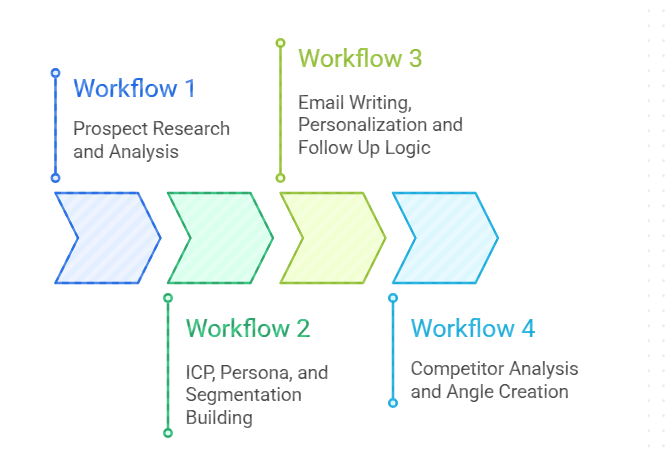
Research usually takes the most time in prospecting. This is where ChatGPT becomes useful when you use chatgpt to do sale prospect research because it converts raw information into quick summaries that make sense.
For example, you can paste a company’s About page and get a short explanation of what they actually sell. You can provide a prospect’s job title and ask ChatGPT to outline their likely responsibilities or pain points. You can even ask for buying signals based on a recent product launch or a leadership change.
These summaries help you decide if a lead is worth pursuing. They also help you decide which angle will resonate. Instead of reading through long pages or scrolling endlessly through LinkedIn, you get one clean view of who the buyer is and what matters to them.
This workflow reduces the time spent switching tabs and gathering details. It also gives you more clarity before writing anything. Accurate understanding leads to better outreach, which increases the chance of getting replies.
A clear ICP removes confusion from prospecting. ChatGPT makes this part easier when using chatgpt for sales prospecting because it turns scattered assumptions into structured insights.
You can describe your ideal customer loosely. ChatGPT will map out motivations, challenges, decision drivers, and objections. You can refine this by feeding your past wins, and it will highlight patterns across customers. This helps shape a more accurate ICP over time.
Segmentation becomes simpler too. If you deal with multiple industries or buyer types, ChatGPT can break them into smaller clusters with unique needs. For instance, a tool used by agencies, SaaS founders, and recruiters will require three different angles. ChatGPT can outline each one with clear messaging points.
These insights help you avoid generic outreach. They also help you build campaigns that feel specific and relevant to the reader. With sharper segmentation, personalization becomes easier and more consistent.
This is the workflow where ChatGPT shines most. You can craft hooks, intros, and value lines quickly without starting from scratch. When exploring chatgpt prompts for sales prospecting, many teams discover how useful it is for shaping tone, structure, and clarity before sending anything.
For example, you can provide a LinkedIn post from your prospect and ask for a simple one line intro that feels natural. You can paste a company description and ask for a short cold email that connects their situation to your offer. You can even generate follow up logic that aligns with your cadence.
ChatGPT helps you test different tones. Some prospects respond better to direct messaging while others prefer softer language. You can generate variations and see which direction feels right before committing.
It also helps you avoid repeating yourself across follow ups. Instead of sending four reminders that say the same thing, you get new angles that keep the conversation alive. This reduces the friction in writing and increases the chance of receiving a reply.
Prospects compare you even before they talk to you. ChatGPT helps you understand this landscape by breaking down competitor messaging. This makes chatgpt for sales prospecting useful for angle development.
You can feed ChatGPT a competitor’s homepage, product page, or feature list. It will summarize their strengths, identify weak spots, and highlight what differentiates them. It can also outline objections prospects may bring up based on that competitor’s narrative.
This helps you shape stronger angles. For example, if a competitor focuses on automation, you can emphasize simplicity or clarity. If they lean on pricing advantages, you can highlight reliability or speed. ChatGPT helps you understand these positioning possibilities without hours of manual comparison.
Angle creation becomes easier because you see multiple storylines you could pursue. You get clarity on how to enter conversations with something unique. This makes your messaging feel sharper and your outreach more strategic.
Once you understand the thinking workflows ChatGPT handles well, the next step is expanding how you use it. Many teams stop at simple prompt usage, but the tool becomes far more valuable when connected to structured systems.
These advanced methods build directly on the earlier workflows and help you use AI in a more consistent and scalable way. They also open new possibilities for using chatgpt for sales prospecting without adding more manual work.
Instead of treating ChatGPT like a standalone assistant, you shift it into a smarter, more integrated part of your overall prospecting setup.
Custom GPTs help you remove repetitive instructions and keep your output consistent. This makes chatgpt for sales prospecting more reliable because your custom model remembers everything about your process.
You can store your tone, ICP rules, outreach frameworks, personalization logic, and preferred message patterns. But the real strength comes from loading your product details. You can add your company’s features, pricing, differentiators, ideal customers, case studies, and positioning. This allows the model to produce context aware output that matches how your product actually works.
For example, if you describe how your tool solves a specific problem, your Custom GPT will always generate messaging that aligns with that solution. It can also tailor pitch angles based on the industry or persona you target. Over time, it feels like a trained SDR who already understands your offer and writes in your voice.
API workflows turn ChatGPT from a manual tool into an automated thinking system. When using chatgpt for sales prospecting, this matters because it removes repetitive tasks while keeping quality high.
With Zapier or n8n, you can trigger actions that run in the background. For example, every time a new lead enters a spreadsheet, the API can generate a profile summary, create a personalized intro line, and tag them with an interest score based on their role and company information.
These workflows help you scale tasks that normally require careful review. You can automate research, personalization, message rewriting, and segmentation without sacrificing relevance. And because the logic sits inside your automation tool, it runs reliably every time.
ChatGPT acts as a multiplier when paired with your existing tools. If you use chatgpt to do sale prospect research, you can apply that clarity inside platforms like Apollo, Clay, or LinkedIn.
For example, once ChatGPT helps refine your ICP, you can ask it to convert those insights into exact Apollo filter conditions. You can paste a list of leads from Clay and have ChatGPT identify common traits or missing segments. You can analyze a LinkedIn profile and produce qualification rules before sourcing similar profiles.
This workflow avoids random filtering and helps you build cleaner lists. It reduces friction and makes each search more accurate before any emails are sent.
Browsing mode gives ChatGPT access to fresh information. This helps with chatgpt for sales prospecting because prospecting often depends on timing and context.
You can review a company’s recent funding round, new hires, product updates, regulatory changes, or industry movements. ChatGPT can then explain how these events create buying triggers or outreach angles. For example, if a prospect just expanded their sales team, you can shape your message around scaling challenges. If they launched a new feature, you can highlight how your product complements that shift.
This adds relevance that static outreach cannot replicate. Your messages feel timely, specific, and grounded in real events.
Good prompts reduce friction and help you move faster.
The prompts below work across research, qualification, analysis, and messaging. They are practical, repeatable, and closely match real prospecting situations.
Instead of generic templates, each prompt here is designed for clarity and context so the tool can respond with precision. This makes them dependable building blocks for everyday work using chatgpt prompts for sales prospecting.
“Here is the company overview and recent news: {paste}.
Study the information and create a structured research brief. Include company size, priorities, current risks, buying triggers, and market context.
Suggest specific problems they may be trying to solve. Connect those problems to my product’s capabilities using simple, direct language that fits an outbound context.
Make the summary easy to skim for fast sales preparation.”
“Here is my ICP description: {paste}.
Here is a company profile: {paste}. Compare both and score the ICP fit from 0 to 100. Explain the score in detail. Break down the match using firmographic, operational, and behavioral signals.
Show where the company aligns with the ICP and where it does not. Highlight potential angles I can use in outreach and note any early warnings that make the fit weaker.”
“Here is the transcript from my sales call: {paste}.
Extract every objection mentioned. Group the objections into themes and list the deeper concerns hidden beneath each one.
Identify signals that reveal the prospect’s priorities and buying motivations. Create an updated ICP persona map using these signals.
Suggest two or three messaging angles based on what the prospect emphasized during the conversation.”
“Here is a dataset of my leads: {paste table or CSV}.
Analyze the patterns across industry, company size, role, engagement, and past conversations. Create a lead scoring formula from 0 to 100 using firmographic, action based, and intent signals.
Provide exact rules for how each signal contributes to the score. Explain the logic behind the formula so it can be applied consistently to future leads.”
“Here is my product: {paste details}. Here is a competitor: {paste details}.
Create a detailed comparison outlining differences in features, positioning, strengths, and weaknesses. Identify gaps where my product provides a stronger advantage.
Turn these gaps into messaging angles suitable for cold outreach. Add a few examples of lines or framing ideas I can use when prospects mention this competitor.”
“Here is the persona: {paste}. Here is my value proposition: {paste}.
Create three cold email templates written specifically for this persona. Each template should reflect their goals, frustrations, KPIs, and daily pressure points. Keep the emails short and conversational.
Use simple language. Focus on one problem and one solution per email. Make sure each variation uses a slightly different angle so I can test what resonates.”
“Here is my ICP: {paste}. Here is a screenshot of my sales tool filters: {describe or OCR text}.
Convert my ICP criteria into exact filter combinations inside this tool. Include job titles, company size, industries, hiring activity, and tech stack.
Suggest variations to widen or tighten the search depending on volume goals. Explain why each filter matters and what type of leads each variation will surface.”
“Here are ten company profiles: {paste}. Rank them by buying likelihood using signals such as hiring trends, funding stage, market timing, internal changes, product launches, and industry pressures.
For each ranking, explain why they appear higher or lower. Identify the strongest pains and the urgency level for each company. Suggest which message angle I should use to approach the top ranked prospects.”
“Use this data to identify buying triggers: {paste news, funding rounds, job postings}. Summarize which companies are most likely entering a buying cycle and why.
Highlight events that signal new budgets, expansion, team reshaping, or operational strain. Create a short explanation for each company. Suggest the outreach angle that best aligns with the specific trigger you identified.”
“Here is the prospect’s LinkedIn bio, company info, the problem I solve, and my product: {paste}. Using all four inputs, write a personalized cold email that feels natural and specific to this prospect.
Match their tone, role, and priorities. Reference details they would immediately recognize. Keep the email short with a clear value line and a simple call to action. Avoid generic wording.”
“Here is the prospect activity log: {paste}.
Use these actions to build an eight step follow up sequence. Tailor each step to their interest signals, such as page views, link clicks, time delays, and partial engagement.
Include different tones and angles across the sequence. Add clear goals for each touch so I understand why it exists. Keep the messages short and relevant.”
“Convert this research into a clean SDR ready note: {paste links, notes, or raw text}.
Summarize the key insights into short bullet points. Highlight buying triggers, role specific challenges, recent changes, and product fit signals.
Add suggested messaging angles and two or three questions the SDR can ask on the first call. Make the notes easy to scan inside a CRM.”
“Here is the company structure: {paste}.
Build a multi contact outbound plan targeting economic, technical, and operational buyers. Identify who influences the deal and who controls budget. Suggest the messaging angle for each persona.
Outline the order of outreach, preferred channels, and the relationship between each touch. Include risks and opportunities in approaching this account.”
“Based on my product and my ICP: {paste}, create a list of discovery questions designed to qualify prospects quickly.
Focus on business pain, urgency, timelines, internal blockers, and decision groups. Include a mix of open ended and direct questions.
Add a short explanation of what each question reveals so I can understand the intent behind asking it.”
“Here are my product documents: {paste}.
Analyze the features, value paths, positioning, and core problems solved. Identify the personas and company types that benefit most.
Break this into primary ICP, secondary ICP, and opportunistic segments. Explain the buying motivations for each group and the scenarios where product fit becomes strongest.”
“Here is my pricing and features document: {paste}.
Identify which persona segments get the strongest value based on their needs, budgets, and expected outcomes. Explain why each segment benefits more than others.
Suggest three messaging angles for each segment that highlight the best feature match, clearest ROI path, and fastest time to value.”
“Analyze these twenty customers: {paste}.
Identify patterns across industry, role, deal size, usage behavior, tech stack, and problems solved. Highlight clusters that signal hidden ICP segments worth targeting next.
Explain why these segments are promising and what triggers make them high potential. Suggest angles and outreach themes suited for each new segment.”
“Here is the new ICP we want to target: {paste}.
Build a complete three channel outreach playbook across email, LinkedIn, and cold calling. Include messaging themes, tone guidelines, first touch ideas, follow up patterns, and CTA variations.
Add specific do’s and don’ts. Provide examples for each channel so the team can execute consistently.”
“Here is my messy lead list: {paste}.
Clean and reorganize the list into clear categories based on fit, industry, role, and timing. Label each lead with a priority level. Identify missing or incomplete data.
Suggest which leads should be contacted first and why. Provide recommendations for improving the list quality going forward.”
“Using ChatGPT, Apollo, Oppora, and N8N, design a full prospecting automation workflow.
Include steps for lead research, enrichment, scoring, personalized email writing, follow ups, and CRM updates. Use real time checks, branching logic, and agent-like decision steps.
Show how each tool fits into the workflow and where data passes between them.”
As you start using ChatGPT more often, the quality of your output depends almost entirely on the quality of your input. This becomes clearer when you use the tool in real prospecting work.
Small details in the prompt can change the accuracy of the research or the tone of a message. This is why giving ChatGPT depth, context, and structure makes the biggest difference.
These practices help you avoid vague responses and keep the tool aligned with your ICP, product, and messaging goals. They also help you stay consistent as you scale your use of ChatGPT across daily tasks.
ChatGPT works best when it understands the full picture. If you are explaining a prospect, include their role, industry, challenges, and company size. If you want an email, give details about the product and the pain you solve. More context leads to sharper, more actionable answers. When you understand how to use chatgpt for sales prospecting, context becomes the fuel that drives every useful output.
If you have research notes, product pages, competitor pages, or LinkedIn profiles, feed them directly into ChatGPT. It handles raw text well. Screenshots also work when you add a short explanation. This helps the tool analyze real information instead of guessing. It also keeps the output tied to the prospect’s actual situation instead of generic assumptions.
If your prompt feels unclear or repetitive, ask ChatGPT to rewrite it for precision. You can request a clearer structure, a more detailed instruction set, or a format that produces more useful output. This becomes especially helpful when building repeatable workflows like email personalization, ICP analysis, or segmentation. It removes friction and teaches the model how you think.
If you have a good cold email, value line, or intro you already use, show it to ChatGPT. Ask the model to follow the same tone, structure, or writing pattern. This helps you maintain consistency across all the messages it generates. It also anchors the model in your real voice.
ChatGPT gives you strong drafts, not final answers. Read everything. Adjust tone. Remove anything that feels off brand. Use ChatGPT as a thinking partner, not a final authority. This mindset keeps your outreach warm, human, and intentional.
Everything in this guide showed how ChatGPT sharpens your thinking, speeds up research, and helps you write better. But once you try to scale real outreach, its limits show up quickly. It cannot verify leads, warm inboxes, rotate domains, send sequences, or manage replies.
That is where Oppora becomes the natural next step. Instead of stitching tools together, you simply tell it what you want. You could type something like: “Find leads with company size 11 to 50 in this industry and this department.”
Oppora.ai will handle:
✅ the search,
✅ enrich the data,
✅ build the workflow,
✅ send the messages,
✅ and qualify replies automatically.
If you want to see how this feels in practice, you can try Oppora on the free forever plan and set up your first agentic campaign.
No credit card, no pressure. Just a chance to see the difference between thinking faster and actually automating the work.
No. ChatGPT helps with thinking, research, and writing. You still need tools for sending, verification, tracking, deliverability, and reply management.
It depends on the information you provide. Accuracy increases when you paste real data, URLs, documents, or screenshots instead of relying on ChatGPT’s assumptions.
Yes, but only for building scoring logic. Actual scoring should happen in your CRM or automation tool to ensure consistency and real time sorting.
Yes, if you remove sensitive information or use enterprise controls. Avoid uploading confidential data unless your organization’s policy explicitly allows it.
Whenever your ICP changes, your product evolves, or your messaging shifts. Well maintained prompts improve output quality significantly.
Summarize with AI
Share