Home
Blog
Find & Send Cold Emails to 500 Unique Prospects Every Month for FREE.
Home
Blog
Manasa Goli
Published December 13, 2025
8 min


Try Oppora AI
Create Self-Running Agentic Sales Workflows like N8N just by chatting with AI
Get Started for FREE
Most B2B founders and small sales teams don’t struggle with selling — they struggle with everything around selling.
Finding leads, verifying emails, sending follow‑ups, replying on time, and updating CRMs quietly eats hours every week — in fact, studies show sales reps spend over 30% of their time on these manual tasks. That’s where sales process automation comes in, helping teams reclaim hours each day and focus on conversations that actually drive revenue.
With the right workflow, you can automate your sales process in under 5 minutes and let the system handle repetitive work while you focus on conversations.
This guide shows exactly how a modern automated sales process works, step by step using real workflows, not just the theory.
Sales process automation is the use of software to systematically handle repetitive, rule-based sales activities so they run without constant human input.
In a traditional sales setup, reps manually push leads from one step to the next — researching prospects, deciding who to contact, sending emails, following up, replying, and updating the CRM. This creates delays, inconsistency, and missed opportunities.
With an automated sales process, those steps are connected into a single, continuous workflow. Each action triggers the next automatically:
Find leads → score them → send outreach → handle replies → book meetings → sync CRM
What makes sales automation effective is connection, not just automation. Lead data flows forward without manual handoffs. Outreach doesn’t pause waiting for someone to click “send.” Replies are handled based on intent, not availability.
When done right, sales process automation:
Importantly, sales automation does not replace human sellers. It replaces the manual friction around selling. Humans still handle strategy, conversations, and closing — but the system takes care of everything that slows them down.
This is why modern teams use sales automation not to “send more emails,” but to run sales as a process instead of a set of tasks.
Let’s see the differences in one glance
Many teams try automating sales and give up. The reasons are predictable:
True sales automation process flow works only when everything is connected — from lead capture to reply handling.
That’s why modern teams focus on workflow‑based automation instead of isolated features.
Below is a practical breakdown of how teams automate their sales process today.
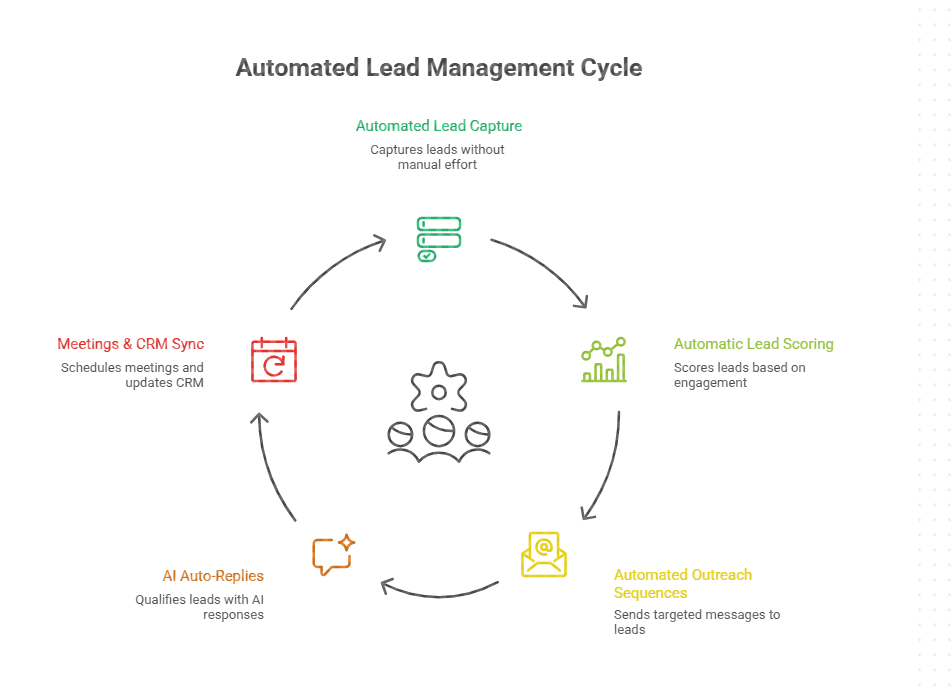
The first step in automating your sales process is removing manual lead research.
Instead of exporting CSVs or scraping profiles, automated systems continuously find leads based on filters like:
Example: A SaaS founder targeting HR managers at 50–200 employee companies sets filters once. New matching leads are added automatically.
Not every lead deserves outreach. That’s why the sales automation process includes lead scoring.
Automated lead scoring ranks prospects based on relevance and fit, helping you:
Instead of guessing, the system prioritizes who should be contacted first.
Outreach isn’t one email. A real automated sales process includes follow‑ups.
Automation handles:
Once configured, campaigns run without daily monitoring.
Example: An agency sets a 5‑step sequence once. The system sends emails and follow‑ups automatically for every new lead.
Most tools stop after sending emails. That’s where sales automation usually breaks. Advanced sales process automation continues after replies arrive.
AI auto‑replies can:
Real scenario: A prospect replies “Can you share more details?” The system responds instantly instead of waiting hours.
The final step is removing admin work.
Automation:
Sales teams focus only on qualified conversations.
This is where teams stop talking about automation and start using it end to end.
Instead of stitching together lead tools, email tools, CRMs, and follow‑up reminders, Oppora lets you set up a complete sales workflow in minutes. You’re not configuring every step manually — you’re approving a system that’s designed to keep running on its own.
Below is what a real, practical setup looks like inside Oppora.
Oppora.ai starts with intent, not configuration.
Instead of manually selecting dozens of filters or uploading lead lists, you describe “who you want to reach”. This becomes the instruction Oppora’s AI Planner uses to build the workflow.
You define:
Example input: “Find HR managers at 50–200 employee SaaS companies in the US that are actively hiring.”
Oppora.ai converts this into structured logic for company discovery, lead sourcing, enrichment, and outreach — automatically.
What happens behind the scenes:
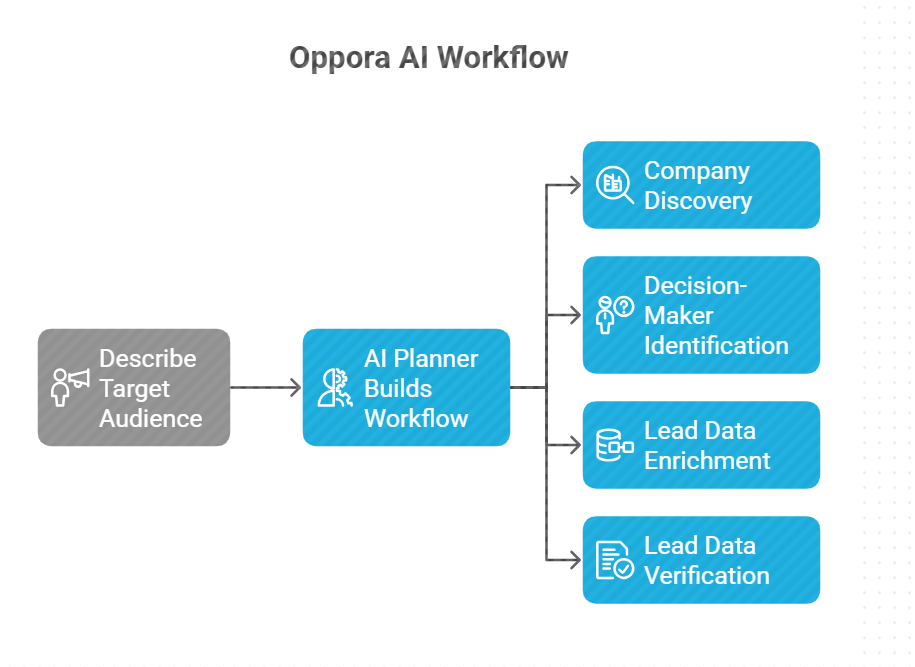
Once the instruction is submitted, Oppora.ai generates a complete, connected sales workflow.
Instead of separate tools, you see one visual flow that includes:
Each step feeds into the next. There are no manual hand‑offs.
At this stage, your job isn’t to build the workflow — it’s to review and confirm it matches your intent.
Before anything is sent, Oppora pauses for human approval.
You can:
This ensures automation runs with oversight — not blindly.
Once approved, you launch the workflow.
From this point on, the system runs continuously:
You don’t restart campaigns or rebuild sequences. The workflow stays active and adapts as new leads enter.
Automation doesn’t stop at sending.
All replies across inboxes appear in a single, shared view. Oppora.ai reads responses, classifies intent, and takes action based on what the prospect says.
The system can:
Your role shifts from chasing replies to handling qualified conversations.
You’ve seen the full setup — from defining your ICP to handling replies in one inbox.
If you want to run this exact workflow with your own leads, domains, and inboxes, you can do it right now.
👉 Log in to Oppora.ai and launch your first automated sales workflow in minutes. No setup maze. No disconnected tools. Just describe who you want to reach and let the system run.
Get started here: Login | Oppora
Sales automation isn’t about speed. It’s about focus.
A well‑designed sales automation process flow removes busywork and lets teams spend time on conversations that matter.
The key takeaway is simple: when your sales workflow is connected end to end, automation removes friction without removing control, allowing teams to focus on conversations, not coordination.
Oppora combines lead sourcing, email sequencing, CRM updates, and follow-ups into one adaptive workflow, cutting setup time and complexity.
Yes. Users give simple instructions, review the workflow, and Oppora handles lead discovery, outreach, replies, and CRM updates automatically.
Isolated task automation causes disconnected workflows and missed leads. True automation connects lead capture, outreach, replies, and CRM updates in one continuous system.
Even a solo founder can launch a complete automated campaign in minutes, with Oppora handling leads, outreach, responses, and CRM updates continuously.
Summarize with AI
Share